Runtime variables reference
ELTMaestro resolves $VARIABLE tokens in step configuration, SQL, and shell commands through
getVarData(). This page is the full catalog of variables initialized at batch and job
scope, plus the platform config variables loaded from system.cfg.
How resolution works
BaseStep.getVarData(input) walks every scope in this order, each seeing the output of the last
(BaseStep.resolveScopes):
- Step scope —
stepVariables, present only when step scope applies to this step. Absent on the overwhelming majority of runs. - Batch scope —
PG.globalVariable($BATCH_*). $STEPIDis replaced with the current step id.- Job scope —
job.jobVariables(everything else below). - Parent-job scope —
job.parentVariables(inherited when a job is launched by another job).
Because substitution is destructive — a name is replaced the first time a scope defines it — the first scope to define a name wins, and later scopes see text in which that token no longer appears. So step beats batch beats job beats parent.
Fixed 2026-09-02 (
7993c8ff8) — shipped in server patche45c8bfc5(5 September 2026); not yet in a numbered server image. Two defects in this chain, both of which produced a silently wrong value rather than an error:
- Any text containing
$var_(the default job-variable prefix seeded by the client,$VAR_0…4) was resolved against job scope alone and returned early. One job variable anywhere in a string — even inside a comment — sent$BATCH_START_DATA_VALIDITY_TIMESTAMPto the warehouse as a literal. Against a varchar watermark column that compares cleanly and loads nothing, or everything, with the batch reporting COMPLETE either way.JobStepflattened a child's inherited package own-then-inherited, andaddVariableoverwrites, so a grandparent's value beat the immediate parent's. Now oneflattenForChild().Still open from that audit: batch scope beats job scope, which is the reverse of the step → job → batch precedence one might expect; and the non-step-aware
JdbcConnection.execute(String)overloads apply no substitution at all.
Values are substituted by literal string replace (multiple passes), so a variable's value may itself
reference other variables as long as they are defined earlier in the same scope. Within each scope the
substitution is longest-name-first — names are replaced in descending length order — so a variable
whose name is a prefix of another (e.g. $var_1 vs $var_11) is never partially substituted.
Template tokens vs variables. Strings like
$TARGET,$COLUMN,$SELECT_QUERYthat appear inside the$QUERY_*/$LOAD_COMMANDtemplates below are step-level placeholders, filled in by the step at execution time — they are not stored variables. They are listed at the end.Runtime log. At batch init the engine logs a
---- Runtime variables ----block with the resolved cutoff, original ($BATCH_*/$JOB_*) and platform-specific values only. Scope/config ($SYSTEM_*,$QUERY_*, othersystem.cfg), connection ($cloud/$jdbc/$ssh.*) and env vars are omitted, and secrets (password / private-key / token) are never printed.
Batch scope — $BATCH_*
Set once per batch run in EngineState.initializeEngine (the only writer of PG.globalVariable).
| Variable | Description |
|---|---|
$BATCH_NAME |
Name of the running batch/workflow (the top job's name). |
$BATCH_ID |
Numeric batch identifier from the metadata database. |
$BATCH_RUN_NUMBER |
Unique run number for this execution; also names the halt file. |
$BATCH_START_DATA_VALIDITY_TIMESTAMP |
Start of the data-validity window for the batch type (incremental-load lower bound). |
$BATCH_END_DATA_VALIDITY_TIMESTAMP |
End of the data-validity window (upper bound). |
$BATCH_DATA_VALIDITY_PERIOD |
Configured validity period/grain for the batch type. |
$BATCH_HIGH_WATERMARK_VALUE |
Batch-scoped high watermark (max of the incremental range). |
$BATCH_LOW_WATERMARK_VALUE |
Batch-scoped low watermark (min of the incremental range). |
$BATCH_HIGHDATE |
Sentinel far-future date 9999-12-31 (SCD2 open-ended end date). The variable is 9999-12-31 on every platform; the ClickHouse SCD2 step nevertheless stamps its current rows 2099-12-31 23:59:59, because ClickHouse DateTime ends in 2106 — see SCD2. |
Batch cycle type — the data-validity window
The $BATCH_*_DATA_VALIDITY_TIMESTAMP values above are derived from the workflow's batch cycle
type — the cadence the batch is meant to run at. The type selects the grain of the
data-validity window (START/END) and the $BATCH_DATA_VALIDITY_PERIOD that incremental steps
use as their lower/upper bounds; the timestamps are computed by database functions keyed on the type.
Types come from the server-side batch_cycle_type catalog (the values shown in the client's Change
Batch Cycle Type dropdown). The default is ONREQ. The full catalog:
| Code | Cadence |
|---|---|
ONREQ |
Runs as required — on demand, no fixed cycle (default). |
00MIN |
Continuous, real-time. |
30SEC |
Every 30 seconds (on the 0th and 30th second of each minute). |
01MIN |
Every minute (on the 0th second). |
05MIN |
Every 5 minutes (00, 05, 10 … 55 past the hour). |
15MIN |
Every 15 minutes (00, 15, 30, 45 past the hour). |
30MIN |
Twice an hour (00 and 30 past the hour). |
HOUR |
Every hour (at the 00-minute mark). |
DAILY |
Once a day. |
WEEK |
Weekly, on the scheduled day. |
WEEKM |
Weekly on Mondays. |
WEEKT |
Weekly on Tuesdays. |
WEEKW |
Weekly on Wednesdays. |
WEEKH |
Weekly on Thursdays. |
WEEKF |
Weekly on Fridays. |
WEEKS |
Weekly on Saturdays. |
WEEKU |
Weekly on Sundays. |
MONTH |
Once per calendar month, on the scheduled day-of-month. |
F_MON |
First day of each calendar month. |
M_MON |
15th (mid) day of each calendar month. |
L_MON |
Last day of each calendar month. |
F_QTR |
First day of each calendar quarter. |
L_QTR |
Last day of each calendar quarter. |
FYEAR |
First day of each calendar year. |
LYEAR |
Last day of each calendar year. |
FFMON |
First day of each fiscal month. |
LFMON |
Last day of each fiscal month. |
FFQTR |
First day of each fiscal quarter. |
LFQTR |
Last day of each fiscal quarter. |
FFYER |
First day of each fiscal year. |
LFYER |
Last day of each fiscal year. |
The type labels the workflow's intended cadence and drives its data-validity window; the actual firing of scheduled runs is configured separately in Administration ▸ Scheduler (cron). A site can add or remove entries in
batch_cycle_type, so the dropdown reflects that catalog.
How a workflow gets its type — resolved at runtime by precedence: the launch CLI --type flag
> the job XML <batchType> element > the type stored in the metadata DB > ONREQ. The
job XML value is what you set in the client: right-click the workflow ▸ Action(s) ▸ Change Batch
Cycle Type (see Workflows — right-click actions).
It writes <batchType> into the job and syncs batch_cycle_type_cd in the DB.
Batch cutoff windows — $BATCH_LAST_SUCCESS_RUN_TS / $BATCH_CUTOFF_*
Also set in EngineState.initializeEngine (via PG.getBatchCutoffWindows(batchId)), these give incremental
processing windows derived from this batch's last successful run. $BATCH_LAST_SUCCESS_RUN_TS is the
max(last_upd_ts) of COMPLETE rows for the batch (1970-01-01 if none). For each grain, START =
date_trunc(grain, last_success) - 1 grain (a lookback that catches late-arriving data and auto-recovers
gaps across failed runs) and END = date_trunc(grain, now()) (only fully-elapsed periods; the in-progress
one is excluded). The window rolls forward automatically as successful runs advance last_success — no
extra state is stored. Format yyyy-MM-dd HH:mm:ss.
The first-run sentinel is
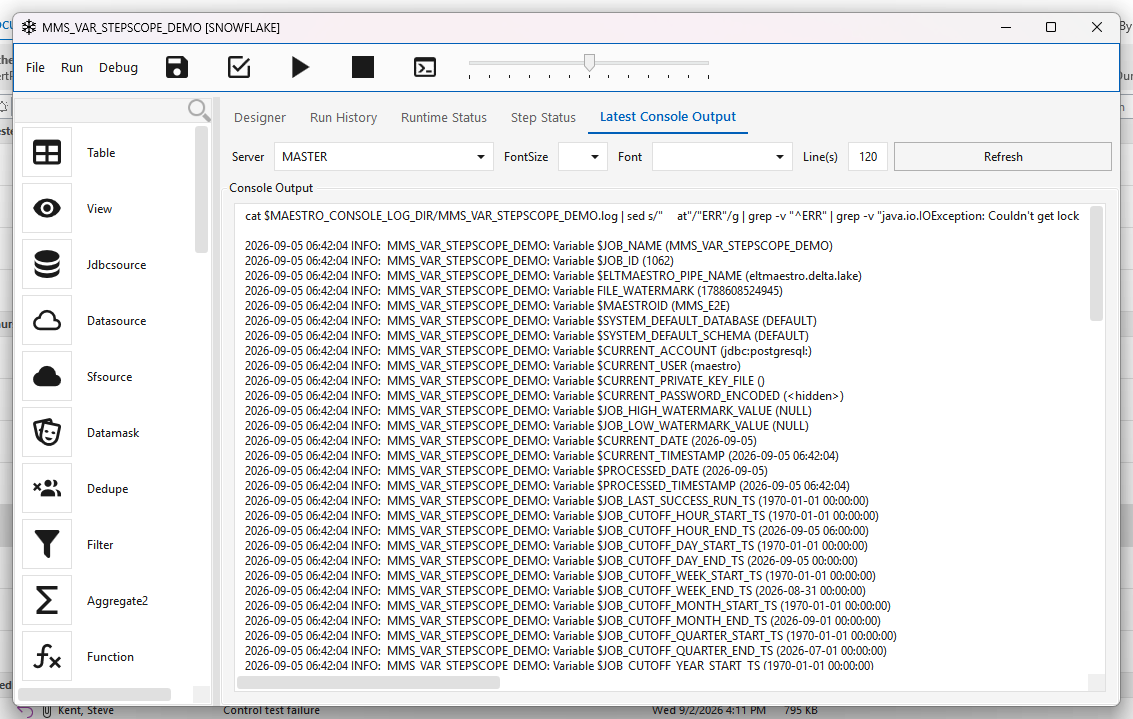
1970-01-01 00:00:00everywhere — since916147345, shipped in server patche45c8bfc5(5 September 2026); not yet in a numbered server image. Three different values used to mean "never ran":1969-12-31,1970-01-01and1990-01-01, depending on which path produced it, so code comparing against one of them silently missed the others. They are now one value, withHelper.isFirstRunDataValidityTs()recognising the legacy spelling for anything already stored.What a never-run job's variables look like in the console —
$JOB_LAST_SUCCESS_RUN_TSand every$JOB_CUTOFF_*_START_TSat the epoch, the*_END_TSvalues current:
The sentinel is owned by the database functions, not the jar.
initdb.sqlruns only on a fresh install, so an installation that has not had the watermark function patch applied still returns the old values however new its engine is. Check withselect calc_end_data_validity_ts('__NO_SUCH_BATCH__');— it must return1970-01-01 00:00:00.
| Variable | Description |
|---|---|
$BATCH_LAST_SUCCESS_RUN_TS |
Timestamp of this batch's most recent COMPLETE run (1970-01-01 if never). |
$BATCH_CUTOFF_HOUR_START_TS / $BATCH_CUTOFF_HOUR_END_TS |
Hour-grain window [trunc(hour,last_success)-1h, trunc(hour,now)). |
$BATCH_CUTOFF_DAY_START_TS / $BATCH_CUTOFF_DAY_END_TS |
Day-grain window [trunc(day,last_success)-1d, trunc(day,now)). |
$BATCH_CUTOFF_WEEK_START_TS / $BATCH_CUTOFF_WEEK_END_TS |
Week-grain window (week starts Monday). |
$BATCH_CUTOFF_MONTH_START_TS / $BATCH_CUTOFF_MONTH_END_TS |
Month-grain window. |
$BATCH_CUTOFF_QUARTER_START_TS / $BATCH_CUTOFF_QUARTER_END_TS |
Quarter-grain window (lookback = 3 months). |
$BATCH_CUTOFF_YEAR_START_TS / $BATCH_CUTOFF_YEAR_END_TS |
Year-grain window. |
Job scope — identity & platform
Set in Job.java while parsing the job document and connecting to the platform.
| Variable | Description |
|---|---|
$JOB_NAME |
Name of the current job. |
$JOB_ID |
Numeric job id. |
$JOB_TYPE |
Platform/job type code (e.g. CLICKHOUSE, REDSHIFT, SNOWFLAKE). |
$PLATFORM_ID / $MAESTROID |
The MPP (platform) connection id the job targets. |
$SYSTEM_DEFAULT_DATABASE |
Default target database — seeded from system.cfg, then overridden from the live MPP connection's catalog. |
$SYSTEM_DEFAULT_SCHEMA |
Default target schema — same seeding/override as above. |
$ELTMAESTRO_PIPE_NAME |
Corelli pipeline name used in staging paths (default eltmaestro.delta.lake). |
Job scope — watermarks & timestamps
| Variable | Description |
|---|---|
$JOB_HIGH_WATERMARK_VALUE |
Job-scoped high watermark (incremental upper bound). |
$JOB_LOW_WATERMARK_VALUE |
Job-scoped low watermark (incremental lower bound). |
$CURRENT_DATE |
Job start date, yyyy-MM-dd. |
$CURRENT_TIMESTAMP |
Job start timestamp, yyyy-MM-dd HH:mm:ss. |
$PROCESSED_DATE |
Processing date (same value as $CURRENT_DATE). |
$PROCESSED_TIMESTAMP |
Processing timestamp (same value as $CURRENT_TIMESTAMP). |
FILE_WATERMARK |
File-based watermark counter. Note: registered without a $ prefix. |
Job scope — cutoff windows ($JOB_LAST_SUCCESS_RUN_TS / $JOB_CUTOFF_*)
The job-scope counterpart of the batch cutoff windows, set in initializeJobVariables() via
PG.getJobCutoffWindows(jobId). $JOB_LAST_SUCCESS_RUN_TS is the max(last_upd_ts) of this job's
COMPLETE rows in batch_cycle_run_job (1970-01-01 if none). Each grain uses the same rule as the
batch cutoffs — START = date_trunc(grain, last_success) - 1 grain (late-data lookback + gap recovery),
END = date_trunc(grain, now()) (completed periods only). Self-rolling; no extra state. Format
yyyy-MM-dd HH:mm:ss.
| Variable | Description |
|---|---|
$JOB_LAST_SUCCESS_RUN_TS |
Timestamp of this job's most recent COMPLETE run (1970-01-01 if never). |
$JOB_CUTOFF_HOUR_START_TS / $JOB_CUTOFF_HOUR_END_TS |
Hour-grain window [trunc(hour,last_success)-1h, trunc(hour,now)). |
$JOB_CUTOFF_DAY_START_TS / $JOB_CUTOFF_DAY_END_TS |
Day-grain window. |
$JOB_CUTOFF_WEEK_START_TS / $JOB_CUTOFF_WEEK_END_TS |
Week-grain window (week starts Monday). |
$JOB_CUTOFF_MONTH_START_TS / $JOB_CUTOFF_MONTH_END_TS |
Month-grain window. |
$JOB_CUTOFF_QUARTER_START_TS / $JOB_CUTOFF_QUARTER_END_TS |
Quarter-grain window (lookback = 3 months). |
$JOB_CUTOFF_YEAR_START_TS / $JOB_CUTOFF_YEAR_END_TS |
Year-grain window. |
Job scope — platform-specific runtime
Populated from the connected platform; only present for the relevant $JOB_TYPE.
| Variable | Platform | Description |
|---|---|---|
$MPP_HOST / $MPP_PORT |
ClickHouse | Load host/port. Taken from system.cfg if set, else the engine falls back to ClickHouse hostName() / tcpPort(). |
$NZ_XID |
Netezza | Last transaction id (_VT_HOSTTXMGR) for consistent partitioned extract. |
$NZ_MIN_DSID / $NZ_MAX_DSID |
Netezza | Min/max data-slice ids (_v_dslice) for slice-partitioned extract. |
$EXA_HOST / $EXA_TOKEN / $EXA_PORT |
Exasol | Host / token / port parsed from the connection string. |
$CURRENT_ACCOUNT |
Snowflake | Session account. |
$CURRENT_ROLE |
Snowflake | Session role. |
$CURRENT_WAREHOUSE |
Snowflake | Session virtual warehouse. |
$CURRENT_USER |
Snowflake | Connection user name. |
$CURRENT_PRIVATE_KEY_FILE |
Snowflake | Path to the key-pair private key (key-pair auth). |
$CURRENT_PASSWORD_ENCODED |
Snowflake | Base64-encoded connection password. |
Job scope — connection variables (dynamic)
Loaded from the metadata DB (one row per connection parameter) so any configured connection is addressable by name. Namespaced by connection type:
| Pattern | Source table | Description |
|---|---|---|
$cloud.<connection>.<param> |
t_connection_general |
Each parameter of a cloud/general (S3/Blob/…) connection, base64-decoded. |
$jdbc.<connection>.user_name |
t_jdbc |
JDBC connection user name. |
$jdbc.<connection>.password |
t_jdbc |
JDBC connection password (decoded). |
$ssh.<connection>.host_name |
connection2 |
SSH host. |
$ssh.<connection>.user_name |
connection2 |
SSH login. |
$ssh.<connection>.password |
connection2 |
SSH password (decoded). |
Job scope — environment variables
initEnvVariables() registers every export VAR=… line from ~/.env_integrator as $VAR, e.g.
$PGDIR, $MAESTRO_CONSOLE_LOG_DIR, $ABCJDBCDIR, $MAESTRO_ENGINE_OPTS. (Exact set depends on the
install's env_integrator.)
Job scope — user-defined
<jobVariable> elements in the job document become job variables. The $var_<name> convention is
the client's default naming (a new workflow is seeded with $STRLEN, $CHARLEN, $PRECISION, $SCALE, then
$VAR_4…$VAR_8 = NULL, numbered from the list position: CreateJob.xaml.cs, web Create Workflow); it carries no special
resolution behaviour. It used to short-circuit the whole chain to job scope, which is the defect
described under How resolution works.
Naming trap, still open. A job variable whose name extends a global's —
$BATCH_IDXagainst the built-in$BATCH_ID— is mangled: substitution is longest-name-first within a scope, but batch scope runs before job scope, so$BATCH_IDis replaced inside$BATCH_IDXand the remainingXis left stranded. Avoid naming a job variable with a built-in as its prefix.
Step scope — a never-run step backfills
A step added to an existing workflow has no history of its own, but the batch does. Under the plain cutoff rules it would inherit the batch's window and take a small delta — silently skipping everything that existed before it was added. The step looks healthy and its table is short.
Step scope closes that. Before a step runs, the engine asks whether this step has ever reached
COMPLETE, keyed on t_step_status(job_id, step_id) — not t_step_watermark. If it never has, the
step gets a private variable package in which the fifteen run-history variables are replaced with
their first-run values (from PG.getFirstRunCutoffWindows()), so its first execution reads from
the epoch and backfills. Every later run uses the normal batch window.
This is unconditional and needs no configuration — a newly-added step backfilling on its first run is the correct default, not an opt-in.
Step scope is the first entry in the resolution chain, so it beats batch scope for those fifteen names and nothing else changes.
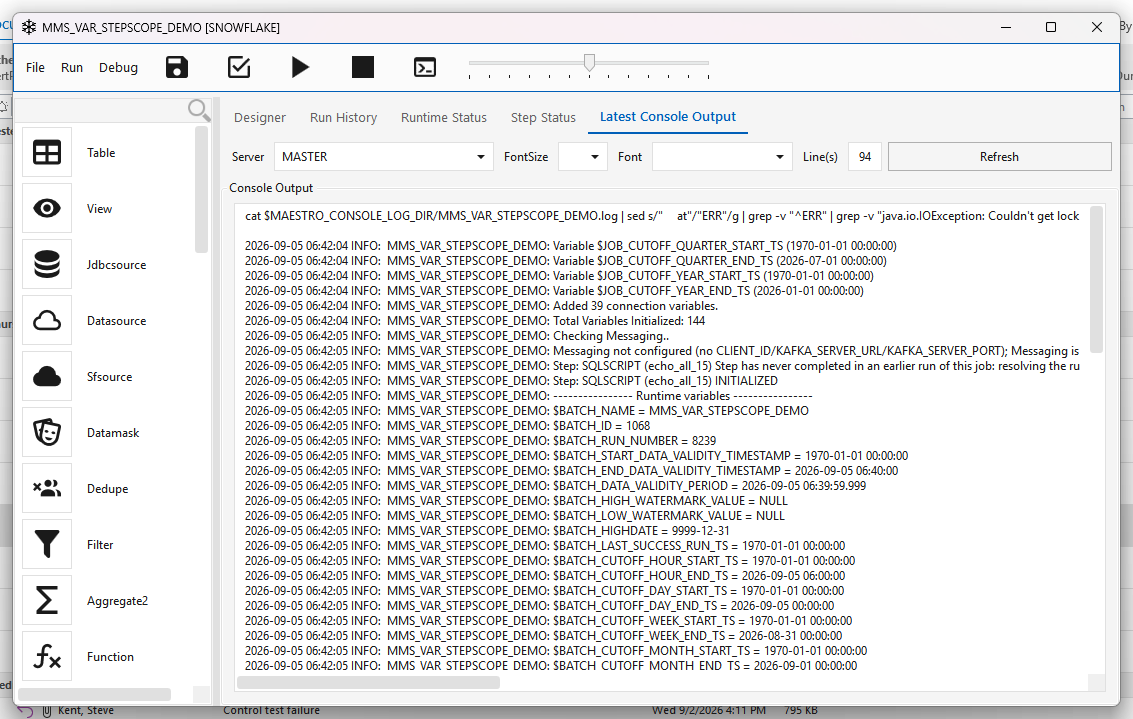
It stands down when run variable overrides are active, and says so in the log:
Step scope suppressed: run-history variables were manually overridden for this run (...). The override wins.
Both features exist to control the same window; if both applied the result would depend on ordering, so the explicit instruction wins.
It stops at a job step, unless you let it through
Step scope is per step. When the new thing is a job step — a whole pipeline added to a batch — the first-run values land on the job step itself. The steps that actually carry the window predicate live inside the called job, are different steps with no step scope of their own, and resolve the ordinary batch window. So on a workflow shaped
the called pipeline loads its usual delta, and the job step's log line still says a full history pull was going to happen. The log now says plainly that the values stop there, and names the two ways through.
Set ELTM_STEP_SCOPE_THROUGH_JOBSTEP=true in the batch user's ~/.env_integrator and the job
step hands its first-run values down to every step inside the job it calls, recursively. The log
records each one:
Step scope inherited from the job step that called this job: the calling step is new to its batch,
so this step resolves the run-history variables to their FIRST-RUN values and extracts its full
history. $BATCH_START_DATA_VALIDITY_TIMESTAMP=[1970-01-01 00:00:00.000]. Enabled by
ELTM_STEP_SCOPE_THROUGH_JOBSTEP; THIS RUN only.
Defaulted off, and deliberately so. Turning it on can convert a quiet nightly delta into a
full-history pull on every nested pipeline that is new to its batch, and a full pull into a loader
that appends rather than merges duplicates rows instead of backfilling it. Check the loaders
before enabling it on an estate you have not audited. Anything other than true/yes/1/on —
including a typo — leaves it off rather than guessing.
Clearing a target does not reset run history. The engine decides "has this ever run" from
t_step_status, never from row counts, so truncating a table and re-running gives you the same delta as before. To reload history deliberately, use run variable overrides — which, unlike step scope, is applied at engine level into global scope and therefore does reach every step inside every called pipeline.
Built in 916147345; test coverage in b4eaca2ae and 0a3e4db58. Shipped in server patch e45c8bfc5 (5 September 2026); not yet in a numbered server image. Job-step propagation and the ELTM_STEP_SCOPE_THROUGH_JOBSTEP gate added October 2026 (open-defects #57, reported by MMS).
Run variable overrides — one-shot manual seeding
The run-history variables are derived, so during development there is no way to ask "what would this load if the batch had last succeeded in January?" short of editing the audit database by hand.
A developer can seed them for a single run from the client's Run dialog (Run Variable Overrides (this run only)), or by dropping the file the dialog writes:
The engine loads it during initializeEngine, applies the values, deletes the file, and logs
each substitution as computed [...] -> using [...]. The next run computes normally.
Seventeen variables may be overridden — the three $BATCH_*_DATA_VALIDITY_*, both
*_LAST_SUCCESS_RUN_TS, and all twelve $BATCH_/$JOB_CUTOFF_*_START_TS. Anything else in the file
is skipped with a logged reason, as is a name written without its leading $.
Absent file == today's behaviour exactly, and a malformed, expired, wrong-job or unreadable file is logged, deleted and ignored — never fatal. A development convenience that can break a production run is worse than no feature.
Full walkthrough, file format and safety properties: Run Variable Overrides user guide.
Engine half 4dddec7b1 — shipped in server patch e45c8bfc5 (5 September 2026); not yet in a numbered server image. Client half 622f148d1 — desktop client 2.5.5.20260905.
Platform config variables — system.cfg
loadConfiguration() loads every KEY=value line from
metadata/integrators/<jobType>/system.cfg into job scope. These differ per platform; the tables
below give the canonical meaning (representative values shown).
System / identity
| Variable | Description |
|---|---|
$SYSTEM_ALIAS |
Human-readable platform name shown in the client (e.g. "Clickhouse OLAP System"). |
$SYSTEM_NAME |
Internal platform code (e.g. REDSHIFT). |
$SYSTEM_DEFAULT_DATABASE / $SYSTEM_DEFAULT_SCHEMA |
Default target DB/schema for the platform (overridable by the connection). |
$SYSTEM_DEFAULT_SSH_CONNECTION |
Named SSH connection used for platform shell operations (e.g. SYSTEM_SSH). |
$SYSTEM_TOKEN_ENCLOSER |
Identifier quote character — ` for ClickHouse/Spark, " for the rest. Drives BaseMeta.quote(). |
$SYSTEM_LARGE_OBJECT_ROWS |
Row count above which a table is treated as "large" (affects load strategy). |
$SYSTEM_VIEW_MATERIALIZATION_THRESHOLD |
Controls when a view is materialized vs. kept virtual. |
$SYSTEM_STATISTICS_THRESHOLD |
Row count above which statistics/ANALYZE is run. |
$MAX_CACHE_SIZE |
Max rows the cache-builder / preview materializes. |
$SCHEMALOADERPARTSIZEBYTES |
Part-file size in bytes for schema/bulk loaders (268435456 = 256 MB). |
$DATAMASK_TAGS |
Comma list of column tags that trigger masking (MASK,PII,GDPR,HIPAA,SOX,PCI-DSS,…). |
$INTEGRATOR_HOST |
Host the integrator runs on (default localhost). |
$ML_BASE |
Base path for ML artifacts (e.g. /ml). |
SCD change-detection hashing
| Variable | Description |
|---|---|
$HASH_TEMPLATE |
Platform SQL expression that hashes $ARG for SCD change detection (e.g. MD5(...)). |
$HASH_RETURNS |
Return type of the hash (VARCHAR, CHAR(32), …). |
$HASH_EXPRESSION |
Full cast wrapper combining $HASH_TEMPLATE and $HASH_RETURNS. |
Encoding
| Variable | Description |
|---|---|
$B64EXPRESSION |
Platform SQL that base64-decodes $COLUMN back to $DATATYPE (Corelli encoded-extract decode). Vendor-specific: ClickHouse base64Decode(...), Redshift FROM_VARBYTE(TO_VARBYTE(...)), Snowflake base64_decode_string(...), Spark unbase64(...). |
DDL / query templates — $QUERY_*
Platform-specific statement templates (filled with $TARGET, $SOURCE, $COLUMNS, etc. at runtime).
| Variable | Description |
|---|---|
$QUERY_CTAS |
CREATE TABLE … AS SELECT (includes engine/ordering clauses on ClickHouse). |
$QUERY_VIEW_CREATE |
CREATE VIEW … AS SELECT. |
$QUERY_TRUNCATE |
Truncate a table. |
$QUERY_DROP_TABLE / $QUERY_DROP_VIEW / $QUERY_DROP_EXTERNAL_TABLE |
Drop DDL for tables / views / external tables. |
$QUERY_STATISTICS |
Refresh statistics (ANALYZE / OPTIMIZE TABLE / no-op). |
$QUERY_VACUUM |
Vacuum statement or no-op where auto-vacuum applies. |
$QUERY_CDC_INSERT / $QUERY_CDC_DELETE |
CDC upsert primitives (insert new, delete matched keys). |
$QUERY_ADD_COLUMN / $QUERY_ALTER_COLUMN |
Schema-evolution DDL (add / retype a column). |
$QUERY_PREVIEW_CACHE |
Preview SELECT … LIMIT $LIMIT. |
$QUERY_CACHE_BUILDER |
CTAS that builds a preview/cache table capped at $MAX_CACHE_SIZE. |
Loading & staging
| Variable | Description |
|---|---|
$LOAD_COMMAND |
Bulk-load command from a local file into the target (e.g. clickhouse-client … INSERT … FORMAT CSV, Snowflake COPY INTO, Yellowbrick ybload). |
$STAGE_COMMAND |
Upload a local file to object-storage staging (e.g. aws s3 cp …). |
$UNSTAGE_COMMAND |
Remove a staged file after load (e.g. aws s3 rm …). |
$OBJECT_STORAGE |
Name of the S3/Blob general connection used for staging (formerly $CORELLI_CONNECTION). |
$AWS_BUCKET |
s3:// bucket for staging; must match the $OBJECT_STORAGE connection's bucket. |
$CLICKHOUSE_CMD |
Base clickhouse-client -h $MPP_HOST --port $MPP_PORT invocation. |
$SCP_CALL |
Template to scp a local file to a remote loader/edge host. |
$SHELL_CALL |
Template to run a remote shell command ($COMMAND) over SSH on that host. |
$GPFDISTPORT |
Greenplum gpfdist port (default 9002). |
$EXAPLUS_CLI_PROFILE |
EXAplus CLI profile name (Exasol). |
$FILESTORE_VOLT_PATH |
DBFS FileStore staging path for volt files (Databricks); uses $VOLTID. |
Hive (SparkSQL external tables)
| Variable | Description |
|---|---|
$HIVE_CONNECTION |
Hive thrift-server connection name for external-table registration. |
$HIVE_DATABASE / $HIVE_SCHEMA |
Hive database / schema for registered external tables. |
Appendix — step-level template tokens (not variables)
These are substituted by the executing step, not stored in a variable package. They appear inside the templates above:
$TARGET, $SOURCE, $SELECT_QUERY, $COLUMNS, $KEY_COLUMNS, $COLUMN, $COLUMN_NAME,
$DATATYPE, $DATA_TYPE, $DATABASE, $SCHEMA, $TABLE, $LIMIT, $ARG, $LOCALFILE,
$FILENAME, $LOGFILE, $BADFILE, $VOLTID, $COMMAND, $STEPID, $GUID.
Source references
- Batch scope:
source/root-engine-core/.../engine/core/control/EngineState.java - Job scope (identity, watermarks, platform runtime, connection vars, env):
source/root-engine-core/.../engine/core/parts/Job.java - Resolution order:
source/root-engine-core/.../engine/core/parts/BaseStep.java(getVarData) - Variable package API:
source/root-engine-core/.../engine/metadata/MaestroVariablePackage.java - Platform config:
source/root-engine-install/db/metadata/integrators/<platform>/system.cfg